PF Withdrawal – Online EPF Withdrawal Complete Procedure
PF Withdrawal – Online EPF Withdrawal Procedure
PF ( Provident Fund ) or EPF is also called the Employee Provident Fund Scheme. It is one where the employees contribute a small portion of their remuneration i.e. 12% of their basic pay every month. A matching amount is contributed by the employer. Such a contribution, together, form a corpus. This is to be used to fund the employee’s retirement. EPF withdrawal by employees can, however, be done earlier itself i.e. during the course of their employment. Such circumstances have been elaborated later in the article.
Read our other articles on PF Claim Status , PF Balance Check, PF Transfer & PF Payment,Budget 2019.
Here, it would be relevant to mention that EPF organisation has made the allotment of UANi.e. the Universal Account Number compulsory for all the employees covered under the PF Act. UAN would be linked to the employee’s EPF account. The UAN remains portable throughout the lifetime of an employee and there is no need to apply for EPF transfer at the time of changing jobs.
EPF WITHDRAWAL
1. When can EPF be withdrawn
One may choose to withdraw EPF completely or partially. EPF can be completely withdrawn under any of the following circumstances:| Sl No | Particulars of reason for withdrawal | Limit for withdrawal | No of years of service criteria | Other conditions |
|---|---|---|---|---|
| 1 | Marriage | Up to 50% of employee’s share of contribution to EPF | 7 years | For the marriage of self, son/daughter, brother/sister |
| 2 | Education | Upto 50% of employee’s share of contribution to EPF | 7 years | For the education of either himself or his children after class 10 |
| 3 | Purchase of land / purchase or construction of a house | For land – upto 24 times of monthly wages plus Dearness allowance For house – upto 36 times of monthly wages plus Dearness allowance | 5 years | The asset i.e. land or the house should be in the name of the employee or spouse or Jointly. |
| 4 | Home loan repayment | Upto a maximum of 90 %, from both employee’s contribution and employer contribution in Employee Provident Fund. | 10 years | i. The property should be registered in the name of the employee or spouse or jointly ii. Withdrawal permitted subject to furnishing of requisite documents as called for by the EPFO relating to the housing loan availed, iii. The accumulation in the member's PF account (or together with the spouse), including the interest, has to be more than Rs 20,000. |
| 5 | Renovation of house | Up to 12 times of the monthly wages | 5 years | The property should be registered in the name of the employee or spouse or jointly. |
| 6 | A little before retirement | Upto 90% of accumulated balance with interest | Once he reaches 57 years ( as per recent amendment) | For himself |
2. Procedure for EPF withdrawal
Broadly, withdrawal of EPF can be done either by:- Submission of a physical application for withdrawal
- Submission of an online application
1. Submission of a physical application
For this, one can download the new composite claim (Aadhar)/ composite claim form (Non-Aadhar) from here : The new composite claim form (Aadhar) can be filled and submitted to the respective jurisdictionalEPFO office without the attestation of the employer whereas, the new composite claim form (Non-aadhaar) shall be filled and submitted with the attestation of the employer to the respective jurisdictional EPFO office.
2. Submission of an online application
Interestingly, the EPFO has very recently come up with the online facility of withdrawal which has rendered the entire process easier and less time-consuming.- UAN (Universal Account Number) is activated and the mobile number used for activating the UAN is in working condition
- UAN is linked with your KYC i.e. Aadhaar, PAN and bank details along with the IFSC code.
Steps to apply for EPF withdrawal online:
Step 1: Go to the UAN portal by clicking here Step 3: Then, click on the tab ‘Manage’ and select KYC to check whether your KYC details such as Aadhaar, PAN and bank details are correct and verified or not.
 Step 4: After the KYC details are verified, go to the tab Online Services’ and select the option ‘Claim (Form-31, 19 & 10C)’ from the drop-down menu.
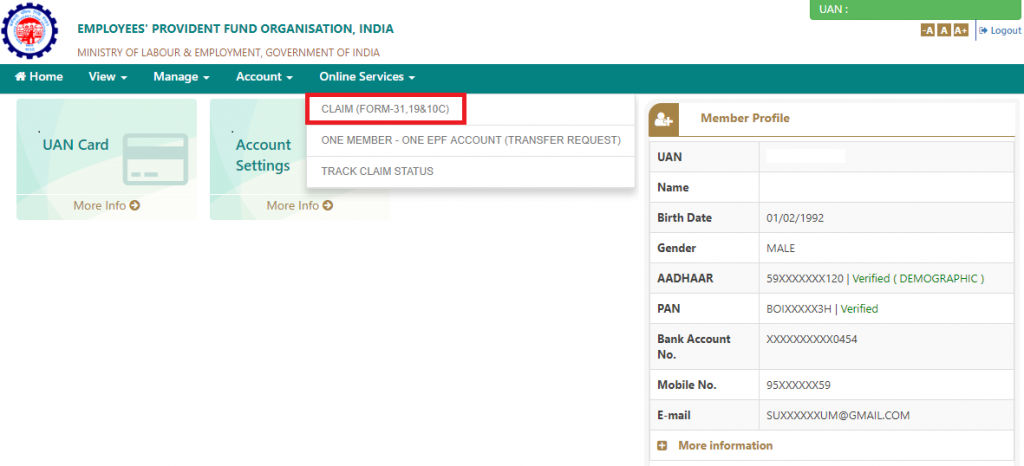 Step 5: The ‘Claim’ screen will display the member details, KYC details and other service details. Enter the last 4 digits of your bank account and click on verify.
 Step 6: Click on “Yes” to sign the certificate of undertaking and then proceed.
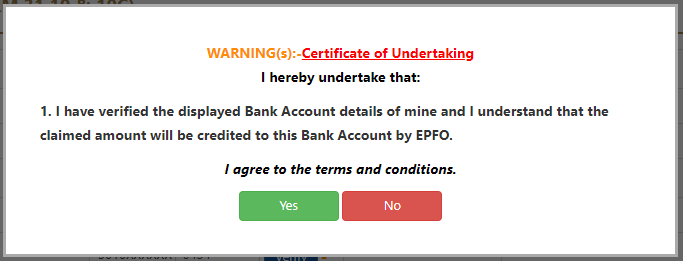 Step 7: Now, click on “Proceed for Online claim”.
google-site-verification: google378c43d898dc6457.html
Comments
Post a Comment